Showing posts with label Internet. Show all posts

Saturday, 24 December 2011

How to hack images on Flickr ( Save Copyrighted Images )

Well you can save Flickr images but not all at all off course. There are some copyrighted images that can not be saved in a simpler way. I will show you how to save copyrighted images from Flickr.


Follow me step by step.

1. Go to Flickr and select the image you want to save.

 2. Right Click on page at empty space and click view page source ( May vary in different browsers )


3. Press CTRL+F and Find JPG


4. Click Next Button and Find image in this format http://farm6.staticflickr.com/5270/5554048546_307c38dc9c_z.jpg

You can easily find this kind of image by clicking next button two times in find bar as show below

5. Click on Image URL 


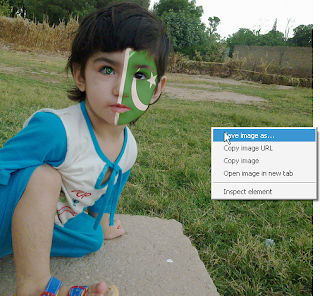
6. Image will be displayed. Right Click on image and click "save image as" and save image.

7. That' it you are done. Enjoy Saving Images.

Saturday, 12 November 2011

PTCL starts broadband services in Sukkur

Karachi—The Pakistan Telecommunication Company Limited (PTCL) under the Universal Service Fund (USF) has started the installation and provision of broadband services in Sukkur Region. This was stated by PTCL’s Senior Executive Vice-President Corporate Development, Sikandar Naqi. In a statement here on Saturday he said that the PTCL is working in a determined manner for the government’s programme of the promotion of the development of telecommunication services and spread of modern information and communication technology services to ensure dissemination of knowledge and information. It said that the PTCL in open bidding obtained the right for provision of broadband services in 10 districts of Sukkur Region. These included Ghotki, Jacobabad, Kambar-Shahdadkot, Khairpur, Nausherferoze, Shaheed Benazirabad (Nawabshah). In these districts 104 educational broadband centres and 51 community broadband centres would also be established, it was further stated.

Thursday, 3 November 2011

Scope of Computer Science ( I.T ) Education in Pakistan

In Pakistan there is not a lot of scope of I.T but it is growing up. It is because of lack of initiative from business owners and lack of skill from computer students. It is habitual in our computer students that they never take any interest in computer studies while they are in it. They just study to get through in exam. When they complete their study they are about empty headed. Another thing students usually might have is lack of creativity and hard work. So it is leading towards unemployment of computer students.

I am sure a computer expert can not stay unemployed if he is professional in at least one thing. Take example of an expert web designer. He could design over 4 websites at least but can make more than 1 lack Rs from these websites. A web designer can sell his designs, and each design might be sold from $5 to thousands of dollars depending upon his creativity. A software engineer can earn even more than that. If you are just a good typist which is most simplest job then you can earn more than 20,000Rs through data entry jobs at home. If you start a blog and work hard on it then you can earn more than 1 lac per month.

There are even hundreds of more ways to earn using your computer. These ideas are only if you don't get a good job being a computer expert .But in fact there are a lot of jobs waiting for you . It just needs your knowledge. So if you have great interest in computer I will advice you to get in this field.

Parents of most of computer interested students never want their son to be a computer expert. It is because they are afraid of current situations in Pakistan. They keep a traditional mind to deny importance of being a computer expert. In fact parents of students also know that coming up age is for computer experts. I just recommend all such parents to please don't get advice from your old friends or a computer failed person. But talk to a real computer expert or a computer teacher of well reputed university. I am sure he will give you a better advice.

Friday, 26 August 2011

Gravitational Mod of Google Search


Do you want to see google search in gravity? Amazed?
Actually, Mr. Doob has created a fun project for all of us. This is actually a website where you can search through Google and may also throw images, links or search bar anywhere. Still amazed? See by yourself by visiting the link below


http://mrdoob.com/projects/chromeexperiments/google_gravity/

Monday, 27 June 2011

Pak Computers Free web template - Download

                                                                   Download
This is a very professional computer website template I have designed for you. It has javascripts included. I hope you would like this template.

Web Page Maker - Easiest Web Building Software

Web Page Maker Screen Shot

System Requirements:

  • Pentium Class CPU (400 MHz or higher recommended)
  • 24 MEG RAM (64 or higher recommended)
  • 16 bit color display (24 recommended)
  • 10 MEG available disk space
  • Windows 7, Windows 95/98/ME/NT4/2000/XP/Vista
  • An Internet Explorer 5.0 or higher (IE6.0 or higher recommended)

                                        Download Website


Main Features

No html coding is required and you do not need any web experience.

Drag and drop the objects. True WYSIWYG layout & design.

Create websites with multiple pages and easily manage your site at once.

The ability to import and edit an existing html page in a WYSIWYG manner.

You can use CSS style sheet to control how the text appears on your site.

Hundreds of functions: photo gallery, rollover image, flash slide show, audio/video, flash video, ready-to-use

Java Script effects, tables, forms, iFrames and much more...

Pre-designed website templates are included.

Preview web pages in browser with one-click.

Publish your web site with just one-click.

Admin Comments

Web Page Maker is a very small size software, but yet very powerful. You can create your personal or business website in minutes. It has built in templates too. It has many java scripts pre installed so you can work at advance level without any programming difficulty. I personally used this software and found it very useful.

Friday, 1 October 2010

Torrents Very Short Review

If you don't know what are torrents then I assure, you are going to love this article. Actually a torrent is a protocol for peer to peer file sharing. If you don't know what torrent means already, then I am very sure that one line definition did not make sense at all. What that means is if I have a file of 700 MB (yeah, those DVDrip/avi files) and host it in my server for my dear pals to download, and if 100 people download from my website, then I have to pay for 700 * 100 = 70GB of bandwidth, plus server maintenance etc.. Anyway don't stuck on it and just go toward simplicity. Torrents are files hosted online of full version software etc. You can download torrents for 100% with a free torrent software. You can do latest games, applications etc for free on torrents sites.

How to get started?

Ok I teach you how to download a torrent step by step. Although, you have to be careful because many torrents are illegal and violate copyright laws.


1.Find a torrent program that will suit your needs, the most common clients are uTorrent, Deluge, Vuze, BitTorrent, and Opera. There are plenty of other clients available as well.

2.Follow the instructions on downloading and installing your chosen client.

3.Go to a torrent site and search for a file you want to download. The Pirate Bay and Mininova are popular sites.

4.Once you have found the desired file on the torrent site, click the "Download This Torrent" (or however they word it). Usually, the web browser's file download manager will ask what to do with this file. You want to open the file with your torrent program.

5.If it doesn't open that way, just save the .torrent file to an easy to locate place. Then open your torrent client and use the "Open Torrent" feature(Most torrent clients support click & drag).

6.The download will start automatically. You may now go and do something to pass the time, because torrents do not require your attention and will download in the background.

Tuesday, 31 August 2010

Check yahoo messenger ID checker if someone is online or offline

Tips of Trade (Finding if some buddy is ignoring you on yahoo
messenger or marked you permanently offline). Replace Username with
id of your buddy whom you want to check & paste the line in address
bar & hit enter

• http://mail.opi.yahoo.com/online?u=[username]&m=g&t=0
This will show you as a yellow smiley if the person is online andgra y if the person is offline or invisible.

• http://mail.opi.yahoo.com/online?u=[username]&m=g&t=1 This will show up as a button with “Online
Now” or “Not Online“

• http://mail.opi.yahoo.com/online?u=[username]&m=g&t=2 This will show an image (125×25) with “I am Online send me a message” or “Not Online right now“

• http://mail.opi.yahoo.com/online?u=[username]&m=a&t=0 This shows a text with “[username] is ONLINE or NOT ONLINE“

• http://mail.opi.yahoo.com/online?u=[username]&m=a&t=1 This shows “00” if person is offline and “01” if his status is online.